
Contents
A communication system must account for network interruptions, not just ideal connections.
Enterprise communication rarely takes place under perfectly stable network conditions. Mobile users move between Wi-Fi and cellular networks, bandwidth changes throughout the day, and temporary outages can interrupt ordinary workflows.
For secure messaging platforms, these interruptions raise practical engineering questions. What happens to a message when a device loses connectivity? How should the application represent a pending message? How can synchronization resume without compromising confidentiality?
1. Resilience begins at the endpoint
When a device cannot reach the messaging service, it cannot transmit a new message to a remote recipient through that unavailable connection.
However, an application that supports offline composition and secure local persistence can allow the user to prepare information and retain it on the device.
This creates an important distinction:
- Saved locally: The message exists on the device.
- Pending synchronization: The application has not yet confirmed successful submission to the service.
- Submitted: The service has accepted the message according to the application’s delivery protocol.
- Delivered: The recipient’s device has received the message, where delivery confirmation is supported.
These states should not be treated as interchangeable. Clear status indicators help users make informed decisions during an interruption.
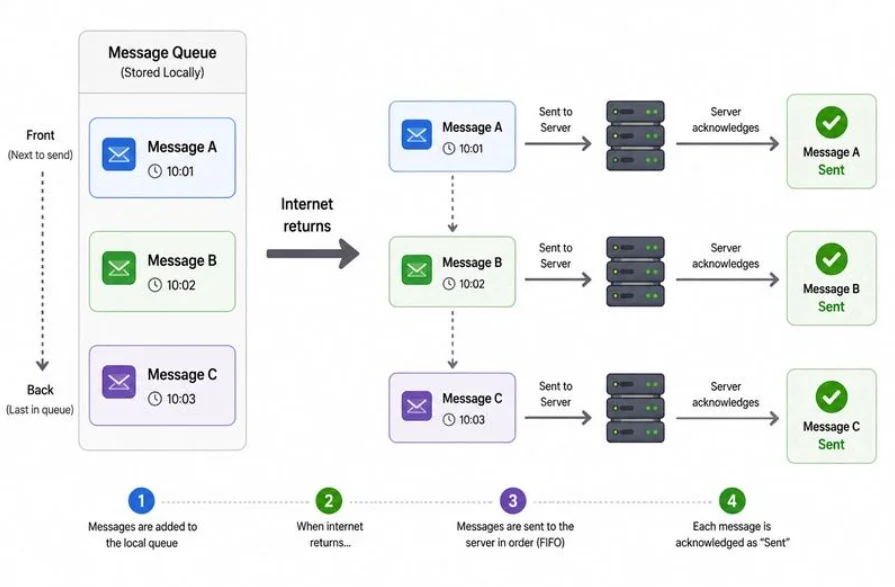
2. The store-and-forward model
A store-and-forward approach allows supported messages to be retained until the necessary connection becomes available.
A typical workflow consists of six stages:
- The user composes a message.
- The application protects and stores it locally.
- Connectivity becomes unavailable, so the message remains pending.
- Connectivity returns and synchronization can resume.
- The service receives the encrypted envelope and coordinates delivery.
- The recipient retrieves and decrypts the message on their device.
A robust implementation must also handle ambiguous failures. For example, the server might accept a message just before the connection drops, leaving the sender without confirmation. Retry and duplicate-handling logic should account for this possibility.
3. Protecting locally retained information
Offline operation increases the importance of endpoint security because information may remain on a device for an extended period.
VedaONE documents encrypted local database storage and platform-specific key protection, alongside end-to-end encryption for messaging.
The objective is to preserve confidentiality both during communication and while supported application data remains stored locally. Key protection, device authentication, operating-system security, and organizational policies remain important parts of this picture.
A temporary loss of connectivity should not cause the application to fall back to sending sensitive messages as plaintext.
4. Secure synchronization
Reconnection is not simply a matter of reopening a socket. A messaging client may need to re-establish an authenticated session, identify pending work, submit messages, reconcile server responses, and update delivery state.
Good synchronization design considers interrupted requests, retry behavior, duplicate submissions, and the difference between local persistence and confirmed server acceptance.
VedaONE documents secure transport and encrypted message handling. The precise behavior of offline queues, retry intervals, and duplicate suppression should be verified against the deployed client version rather than assumed from the architecture alone.
5. Messaging is different from voice and video
Text messages can often tolerate delays. Live voice and video cannot tolerate the same degree of interruption.
VedaONE documents WebRTC signaling and Pion SFU-based media forwarding. These components support live communication, but an active call still requires a viable network path and available supporting services.
A resilient design therefore treats each workload differently: queued messages may wait, file transfers may require recovery strategies, and live calls must respond to changes in connectivity and media quality.
6. The infrastructure matters too
Customer-controlled hosting gives organizations control over where the platform operates, but self-hosting alone does not guarantee high availability.
Operational resilience depends on the chosen deployment, including network connectivity, power, storage, monitoring, backup procedures, service supervision, and any configured redundancy.
Organizations should evaluate both sides of the communication path: the mobile endpoint and the infrastructure responsible for receiving and routing messages.
Conclusion
Network resilience is not a promise that communication will never be interrupted. It is the discipline of handling interruptions safely and predictably.
By separating local persistence from server acceptance and recipient delivery, protecting information on devices, and designing for careful synchronization, secure communication systems can provide a clearer and more dependable user experience.
For VedaONE deployments, offline behavior and recovery guarantees should always be described according to the capabilities verified in the relevant application version and configuration.
Next in the series: Deploying VedaONE in a Customer-Controlled Environment.
Product note: Offline queuing, automatic retries, and delivery-state behavior are implementation-dependent and should be verified before being represented as guaranteed product features.
Was this article helpful?